
 New · Debuting at NPE2027, Booth S14115
PlantStar QMSQuality Management System
Replace paper check sheets with digital quality forms at every press. Operators fill them in at the machine, PlantStar fills in the job and downtime details, and quality sees every check, every fix and every change in one place.
Request a previewSee it at NPE2027
 QUALITY CONTROL : FORM VIEWER
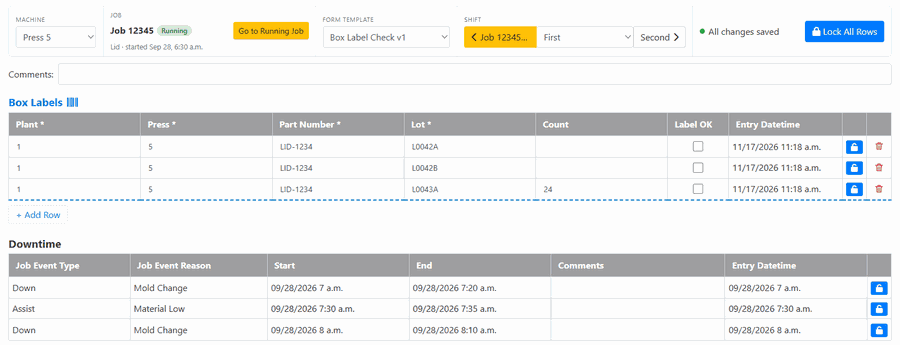
A box label check on Job 12345: labels scanned straight into the form, and downtime filled in automatically from PlantStar.
Paper check sheets slow quality down
Most plants still run quality checks on clipboards. The data is there, but it is hard to read, hard to find and too late to act on.
What PlantStar QMS does
A quality system built to work beside PlantStar, so your checks are tied to the real machine, job and product.
Digital forms at the press
Operators open the form for the job running on their machine and fill it in by shift, by day or by job. It opens on the running job, so there is nothing to look up.
Filled in from PlantStar
Machines, products, jobs and shifts come straight from PlantStar. Down and Assist events fill the form on their own, with reason, start and end, and operators just add comments.
Barcode scanning
Scan a box label and its plant, press, part number and lot drop into the right columns. Labels that don’t match the expected layout are refused, so bad data never gets in.
Mistakes caught on the spot
Required fields and wrong values are flagged in red the moment they are entered, and a row can’t be locked until it is fixed. Every row saves itself, so nothing is lost.
Build your own checks
Quality staff design form templates with the columns they need, assign them to products or product groups, preview them, and copy them to other plants. Changes create a new version, so finished forms keep the version they were filled in on.
Find any form in seconds
Search and filter completed forms by template, machine, job, product, shift or date, and see at a glance which ones have invalid rows.
A complete audit trail
Every change, sign-in and sign-out is recorded with who made it, when, and the value before and after. You have an audit-ready history without extra paperwork.
Multi-plant, role-based access
Operators see only their forms. Quality staff, plant administrators and company administrators get the tools they need, and people can switch between the plants they work at.
How it works
Three steps from paper to paperless.
Design your forms
Turn your existing check sheets into form templates and assign them to the products they cover.
Check at the machine
Operators fill in or scan values at the press. PlantStar supplies the job and downtime details.
Review and prove it
Quality reviews completed forms, fixes flagged rows, and has the full history ready for any audit.
Easy on your IT team
Hosted and maintained by SYSCON, so there are no servers to manage.
- Runs in a web browser: nothing to install on the shop floor.
- Hosted by SYSCON: monitored, with daily backups and updates handled for you.
- Microsoft sign-in: people can sign in with their company Microsoft account.
- Shared-screen friendly: operators switch users at a shared station in a click.
- Every plant in one system: one company, many plants, each in its own time zone.
- Connects to PlantStar: each plant links to its PlantStar with a connection code.
Be among the first to see it
PlantStar QMS makes its debut at NPE2027.
- Booth S14115, South Hall, Orange County Convention Center, Orlando
- May 3–7, 2027
- Live booth demos: Mon–Thu 9am–5pm ET, Fri 9am–3pm ET
Request a preview
Get an online preview before the show, or book a time at our booth. Tell us about the checks you run today.